1. Pick an animation
Point the baker at an Animation Sequence, Composite, or Montage on your skeletal mesh.
Unreal Engine 5 | Rendering
Bake Vertex Animation Textures from skeletal meshes and play them back on instanced static meshes, rendering thousands of animated characters without the cost of per-instance skeletal animation.
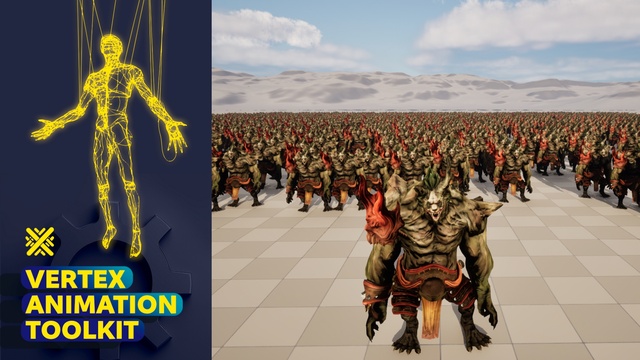
Showcase
Watch the Vertex Animation Toolkit bake skeletal animation into textures and play it back across a crowd of instanced meshes.

Why VAT
Rendering a large number of animated characters with traditional skeletal meshes gets expensive fast: every instance pays for its own bone evaluation on the CPU. That's the wall you hit when you try to fill a battlefield, a stadium, or an RTS army.
Vertex Animation Textures flip the problem. The Vertex Animation Toolkit bakes your skeletal animation into a texture, then plays it back entirely in the material on the GPU. Combined with Instanced and Hierarchical Instanced Static Meshes, that means you can draw thousands of animated meshes in a single draw path, with no per-instance skeletal overhead.
It's the same technique AAA studios use for crowds and hordes, packaged as a documented, drop-in Unreal Engine 5 plugin with the baking tools, materials, and runtime helpers already built for you.
Features
From baking to runtime playback, the toolkit covers the full pipeline so you can focus on your game instead of the plumbing.
Generate Vertex Animation Textures directly from an Animation Sequence, Animation Composite, or Animation Montage of your skeletal mesh.
Play baked animations on Instanced and Hierarchical Instanced Static Meshes to render huge crowds in far fewer draw calls.
Ship several levels of detail so distant instances get cheaper automatically and your frame budget scales with the scene.
Automatic vector calculation improves normal accuracy so animated instances stay crisp and free of shimmering edges.
Included VAT materials and material functions handle the playback math for you. Plug in your textures and go.
Blueprint & C++ helpers let you pick and drive animations at runtime by index, cutting development time to a fraction.
Workflow
Point the baker at an Animation Sequence, Composite, or Montage on your skeletal mesh.
The toolkit generates the vertex textures and a static mesh, with your chosen LODs.
Drop the included VAT material onto an ISM/HISM and assign the baked textures.
Use the helper functions to select and play animations by index across every instance.
Full setup instructions, screenshots, and API reference live in the official documentation.
At a glance
FAQ
A Vertex Animation Texture stores per-vertex animation data in a texture so the GPU can replay the animation directly in a material. Because there's no per-instance skeletal evaluation, you can render very large numbers of animated meshes efficiently.
You can bake VAT from an Animation Sequence, an Animation Composite, or an Animation Montage of a skeletal mesh.
Yes. The baked animation plays back on both ISM and HISM components. That's exactly what lets you render thousands of animated instances at a fraction of the usual cost.
Yes. The toolkit ships with runtime helper functions and materials that are accessible from both Blueprints and C++.
The full documentation (installation, baking, materials, and runtime usage) is available here.
Better together
Vertex Animation Toolkit renders thousands of animated meshes; Crowd Toolkit moves thousands of agents as coordinated groups. Feed crowd positions straight into your instanced meshes and you have a full pipeline of coordinated movement and cheap animated rendering for battles, hordes, and armies at scale.

Grab Vertex Animation Toolkit on Fab, or reach out if you need a custom rendering system built for your project.